
Connecting Everything with Wized
This guide walks you through connecting your WordPress frontend with the Xano backend using Wized. We'll cover Apps, Requests, Variables, Elements, and Workflows.
Step 1: Create Apps
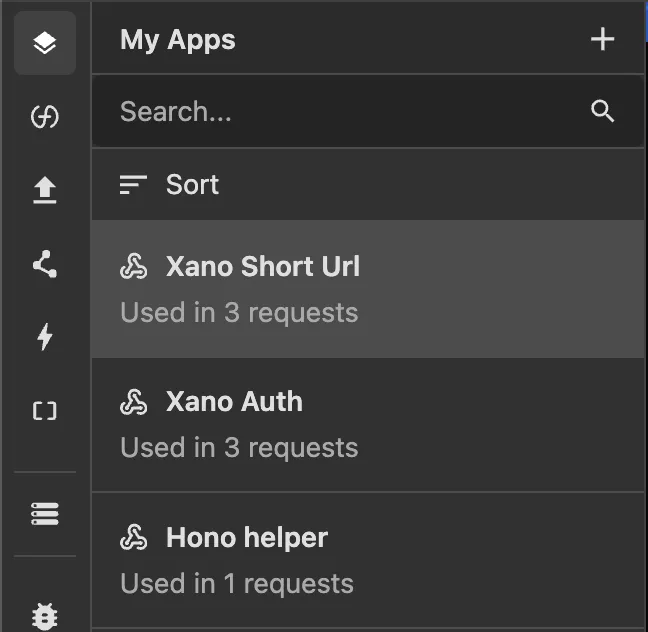
Apps in Wized represent your API connections. For this URL shortener, we need two Xano apps:
| App Name | Base URL | Purpose |
|---|---|---|
| Xano Auth | Xano base url for auth endpoints | User authentication |
| Xano Short Url | Xano base url for short url endpoints | URL shortening operations |
| Hono helper | We use this to fetch the title of the Website before saving to Xano | Fetch title |
Learn More
Check out the Apps documentation to learn how to create and configure Apps in Wized.
Step 2: Set Up Variables
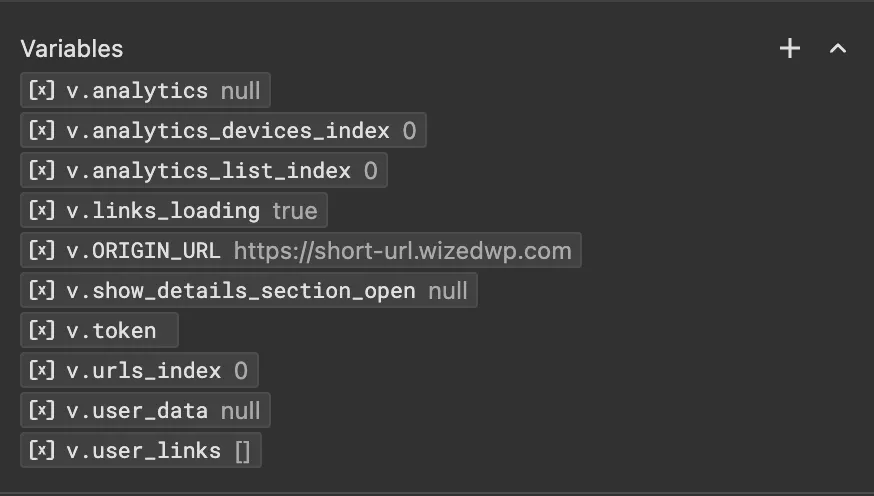
Variables store data that persists across your application. Create the following variables:
User management variables:
| Variable Name | Storage Type | Initial Value | Purpose |
|---|---|---|---|
token | Session Storage | '' | Stores the authentication JWT token |
user_data | Session Storage | null | Stores the authenticated user's data |
Links management variables:
| Variable Name | Storage Type | Initial Value | Purpose |
|---|---|---|---|
user_links | Local Storage | [] | Stores the user's shortened URLs |
links_loading | None | true | Stores the loading state of links |
Index variables
| Variable Name | Storage Type | Initial Value | Purpose |
|---|---|---|---|
urls_index | None | 0 | Helper to render the list of urls, and access a specific item |
analytics_countries_index | None | 0 | Helper to render country analytics |
analytics_devices_index | None | 0 | Helper to render device analytics |
Constant variables
| Variable Name | Storage Type | Initial Value | Purpose |
|---|---|---|---|
ORIGIN_URL | None | https://short-url.wizedwp.com | Save the Origin of the url shortener app |
UI State management
| Variable Name | Storage Type | Initial Value | Purpose |
|---|---|---|---|
show_details_section_open | None | false | state of the analytics details section, opened or closed |
Learn More
Check out the Variables documentation to learn how to create and configure Variables in Wized.
Step 3: Create Reusable Helper functions
Reusable helper functions in Wized allow you to define custom JavaScript logic that can be called from any expression throughout your project.
Example: For our URL shortener, we'll create a function called get_random_string that generates random alphanumeric strings for short codes.
| Function Name | Parameters | Purpose |
|---|---|---|
get_random_string | n | Generates a random string of length n |
// get_random_string function
return Math.random().toString(36).slice(2, p.n);
This function is called when creating new short URLs: Wized.functions.get_random_string({ n: 10 }) generates a unique 10-character code for each shortened link.
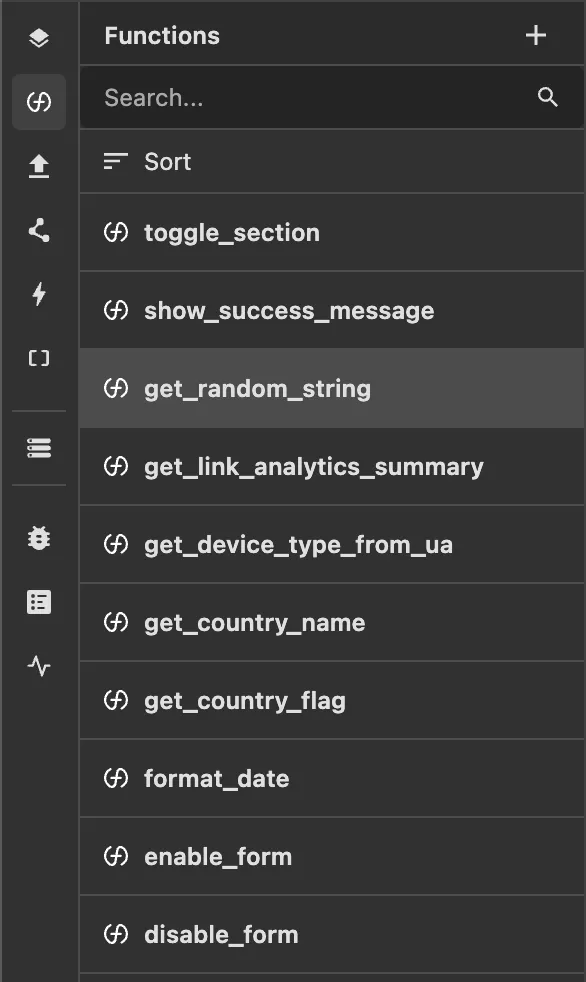
Below are all functions used in this demo:
| Function Name | Purpose |
|---|---|
toggle_section | Shows or hides a UI section (e.g., analytics details panel) |
show_success_message | Displays a success notification to the user |
get_random_string | Generates a random alphanumeric string of specified length |
get_link_analytics_summary | Returns aggregated analytics data for a shortened link |
get_device_type_from_ua | Parses the user agent string to determine device type |
get_country_name | Converts a country code to its full country name |
get_country_flag | Returns the flag emoji for a given country code |
format_date | Formats a date value into a human-readable string |
enable_form | Enables form inputs (e.g., after successful submission) |
disable_form | Disables form inputs (e.g., while a request is in progress) |
Learn More
Check out the Functions documentation to learn how to create and use reusable functions in Wized.
Step 4: Create Wized Requests
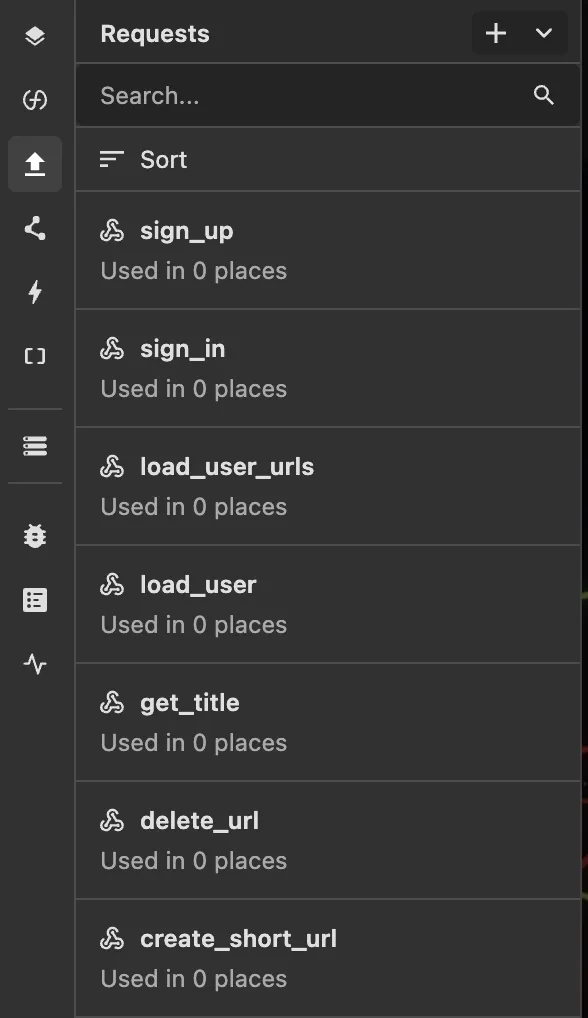
Requests in Wized are how you communicate with external APIs. Each request defines an endpoint, method, headers, and body parameters. They can be executed from workflows or triggered by element interactions, and their responses can be stored in variables for use throughout your application.
For our URL shortener app we need these requests
Authentication Requests
Sign Up Request
Creates a new user account.
| Property | Value |
|---|---|
| App | Xano Auth |
| Props | email, password |
| Method | POST |
| Endpoint | /auth/signup |
| Body | email, password |
Values for body:
email = 'return p.email'
password = 'return p.password'
Sign In Request
Authenticates an existing user and returns a token.
| Property | Value |
|---|---|
| App | Xano Auth |
| Props | email, password |
| Method | POST |
| Endpoint | /auth/login |
| Body | email, password |
Values for body:
email = 'return p.email'
password = 'return p.password'
Load User Data Request
Fetches the current user's data using the stored token.
| Property | Value |
|---|---|
| App | Xano Auth |
| Method | GET |
| Endpoint | /auth/me |
| Authorization | Bearer Token from v.token |
URL Management Requests
Create Short URL Request
Creates a new shortened URL.
| Property | Value |
|---|---|
| App | Xano Short Url |
| Props | url, title |
| Method | POST |
| Endpoint | /short_link |
| Authorization | Bearer Token from v.token |
| Body | url, title, short_code |
Values for the body:
email = 'return p.email'
password = 'return p.password'
short_code = 'return Wized.functions.get_random_string({ n:10 })'
Load User URLs Request
Fetches all shortened URLs for the authenticated user.
| Property | Value |
|---|---|
| App | Xano Short Url |
| Method | GET |
| Endpoint | /short_link |
| Authorization | Bearer Token from v.token |
Delete URL Request
Deletes a shortened URL by ID.
| Property | Value |
|---|---|
| App | Xano Short Url |
| Method | DELETE |
| Endpoint | /short_link/${p.id} |
| Authorization | Bearer Token from v.token |
| Props | id (URL ID to delete) |
Step 5: Create Wized Workflows
Workflows orchestrate multiple actions in sequence. Here are the key workflows:
Sign In Workflow
Handles user login and redirects to the dashboard.
Name: sign_in_workflow
Props: email and password
1. Execute Request: sign_in (with form email & password)
2. Condition: Check if request succeeded
   ├─ Success:
   │   ├─ Set Variable: token = response.authToken
   │   ├─ Run Workflow: load_user_workflow
   │   └─ Navigate: /dashboard/
   └─ Error:
       └─ Show error message (alert)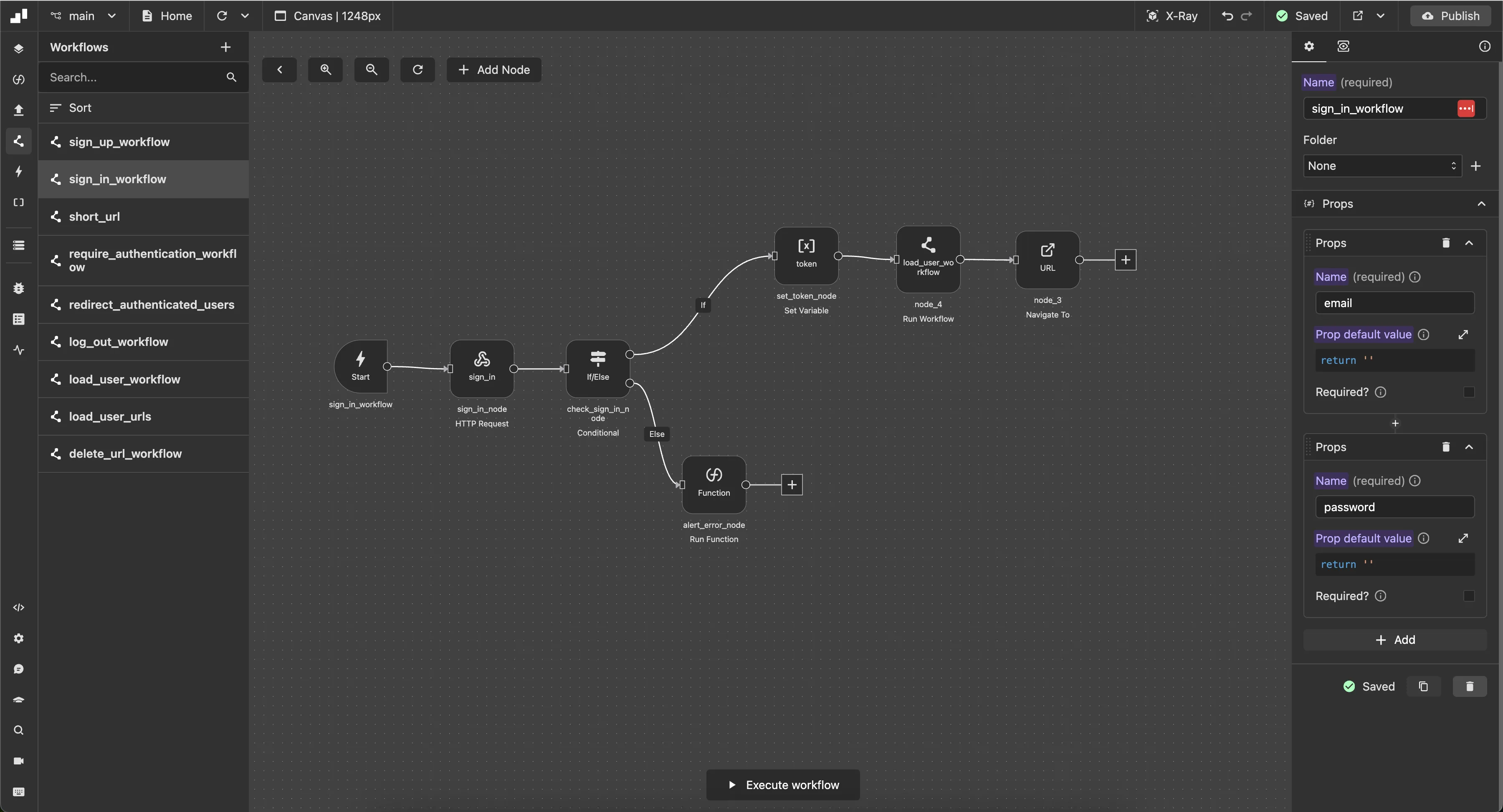
Sign Up Workflow
Handles user registration and redirects to the dashboard.
Name: sign_up_workflow
Props: email and password
1. Execute Request: sign_up (with form email & password)
2. Condition: Check if request succeeded
   ├─ Success:
   │   ├─ Set Variable: token = response.authToken
   │   ├─ Run Workflow: load_user_workflow
   │   └─ Navigate: /dashboard/
   └─ Error:
       └─ Show error message (alert)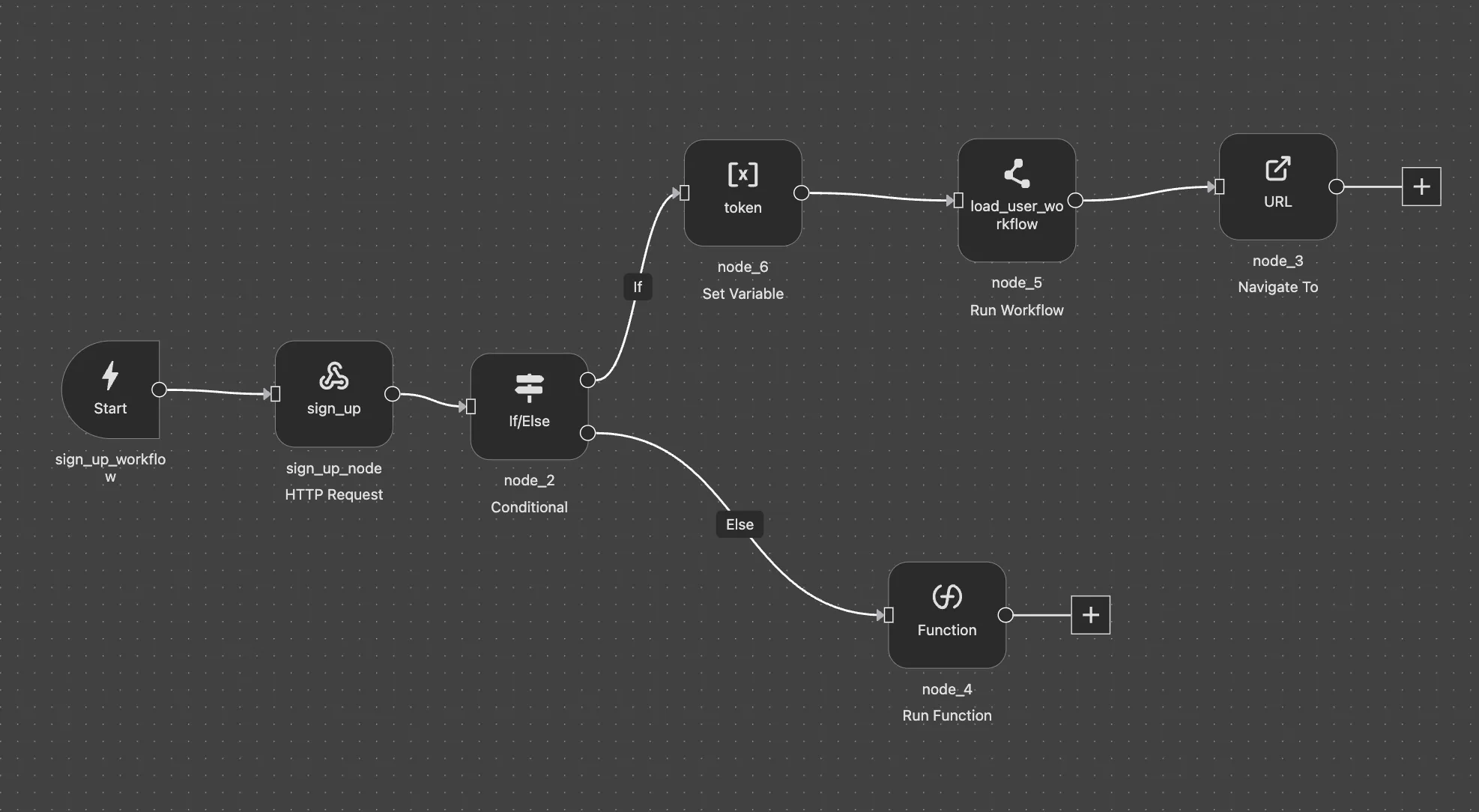
Load User Workflow
Fetches and validates the current user's authentication status.
Name: load_user_workflow
1. Execute Request: load_user
2. Condition: Check if request succeeded
   ├─ Success:
   │   └─ Set Variable: user_data = response.data
   └─ Error:
       └─ Run Function: Alert session expired, clear token & user_data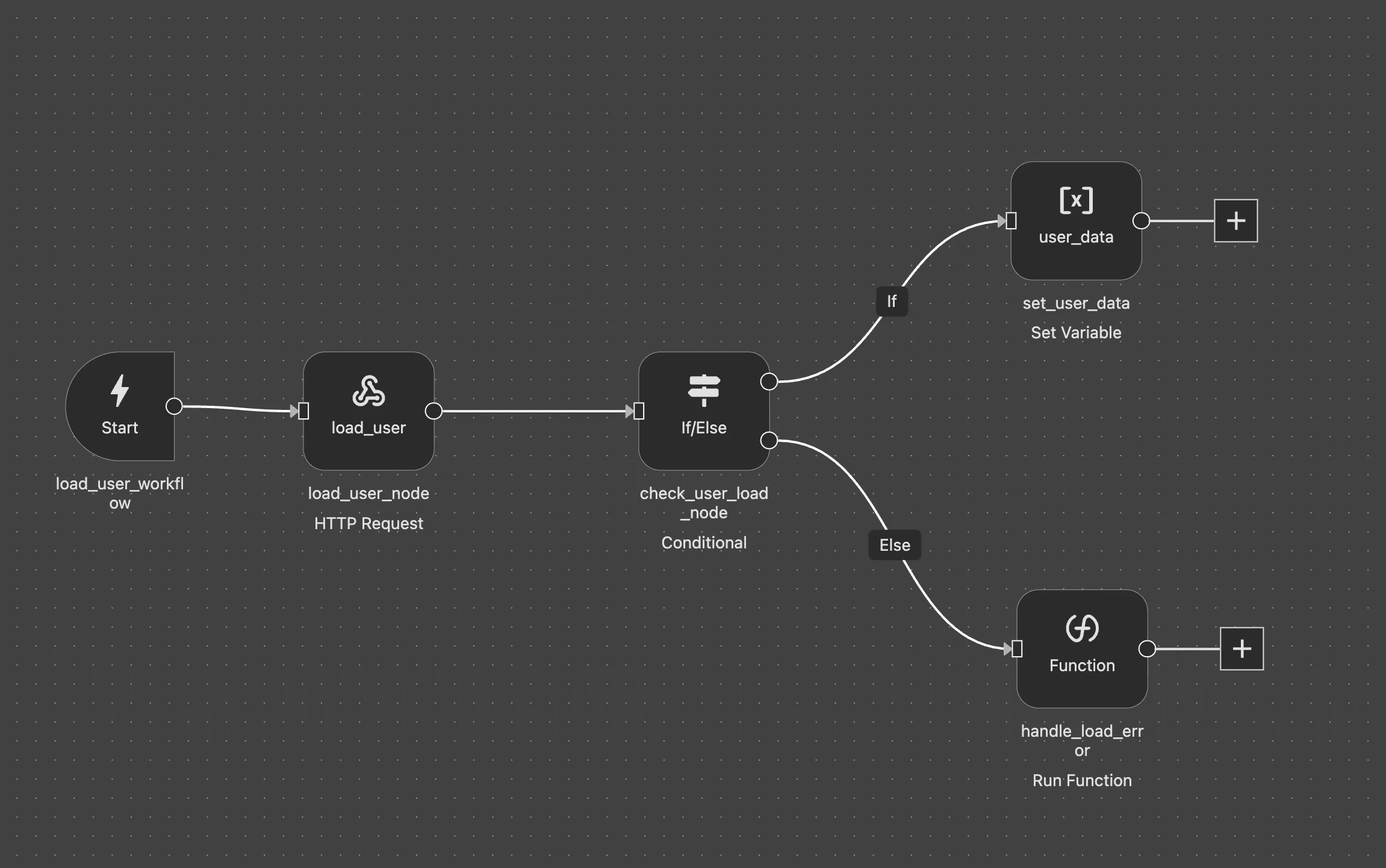
Log Out Workflow
Clears user session and redirects to sign-in page.
Name: log_out_workflow
1. Set Variable: token = null
2. Set Variable: user_data = null
3. Set Variable: user_links = []
4. Navigate: /sign-in/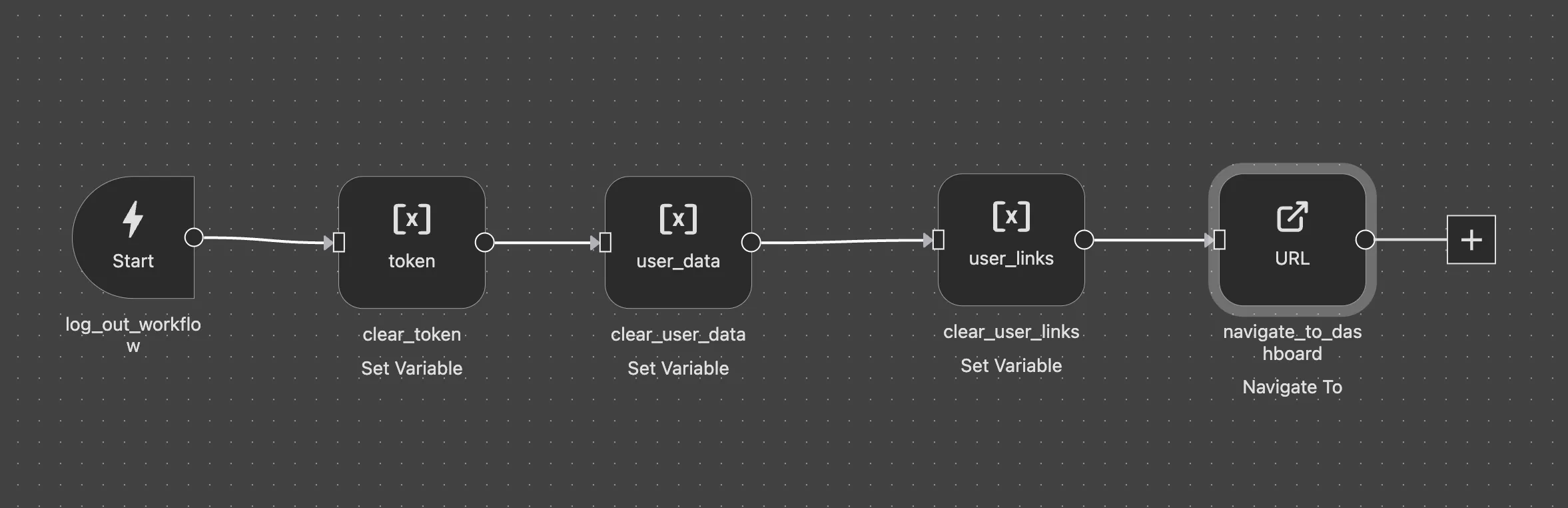
Load User URLs Workflow
Fetches the authenticated user's shortened URLs.
Name: load_user_urls
1. Execute Request: load_user_urls
2. Set Variable: user_links = response.data
3. Set Variable: links_loading = false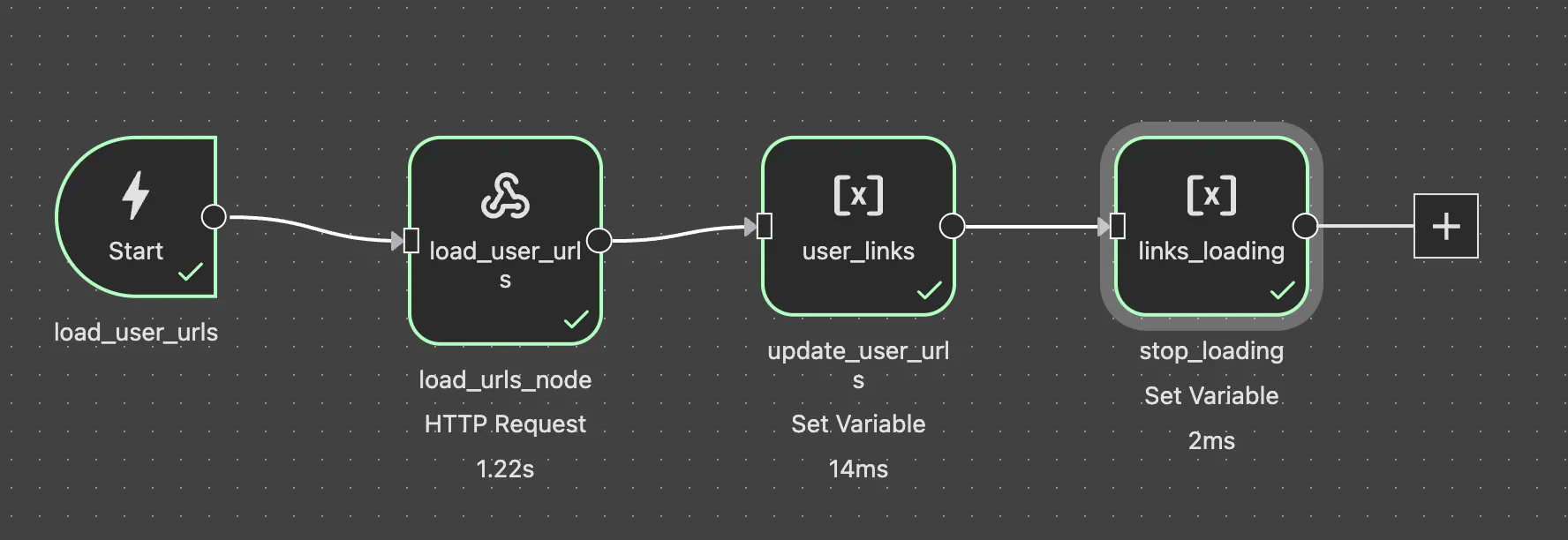
Short URL Workflow
Creates a new shortened URL with automatic title fetching.
Name: short_url
Props: original_url
1. Run Function: disable_form
2. Execute Request: get_title (fetch page title from URL)
3. Execute Request: create_short_url (with original_url & fetched title)
4. Run Function: enable_form
5. Set Variable: user_links = [new_url, ...existing_urls]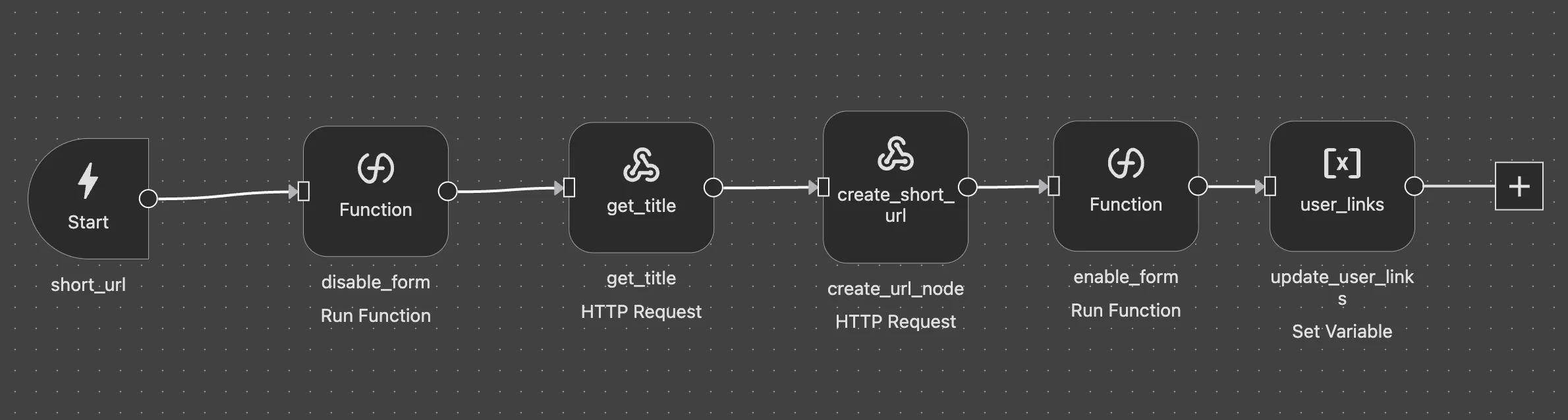
Delete URL Workflow
Removes a URL and updates the list.
Name: delete_url_workflow
Props: id
1. Execute Request: delete_url (with URL id)
2. Set Variable: user_links = filtered array (remove deleted item)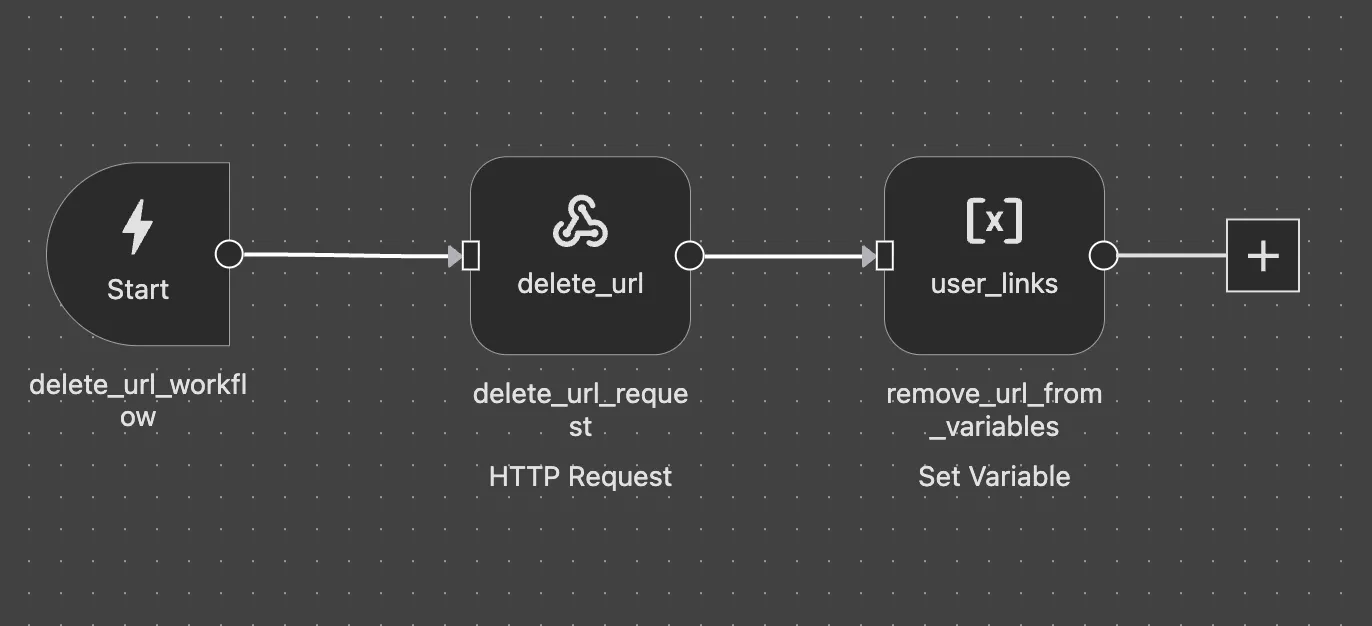
Require Authentication Workflow
Redirects unauthenticated users to sign-in page.
Name: require_authentication_workflow
1. Condition: Check if token is missing
   ├─ No token:
   │   └─ Navigate: /sign-in/
   └─ Has token:
       └─ Continue (no action)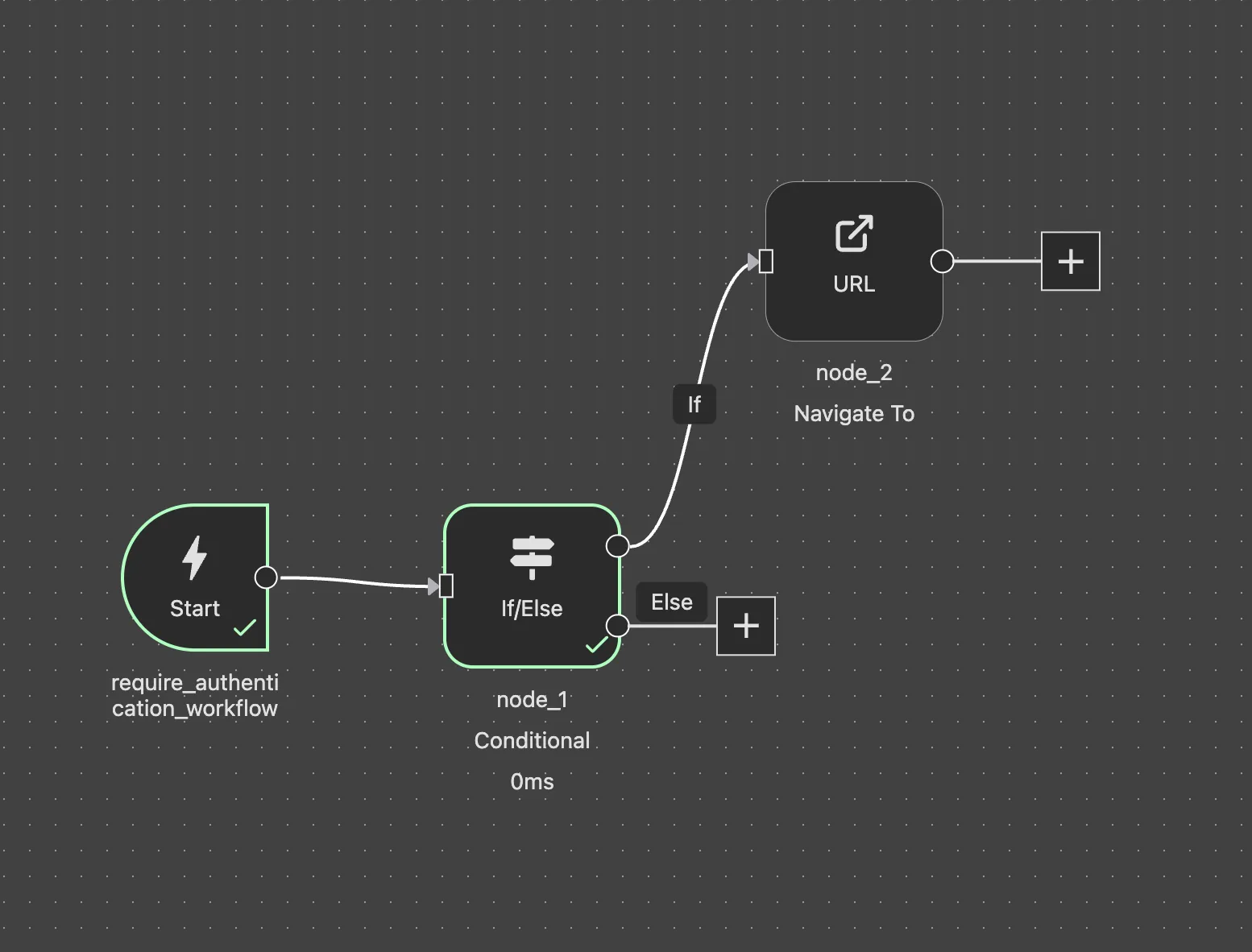
Redirect Authenticated Users Workflow
Redirects already authenticated users away from auth pages.
Name: redirect_authenticated_users
1. Condition: Check if token exists
   ├─ Has token:
   │   └─ Navigate: /dashboard/
   └─ No token:
       └─ Continue (no action)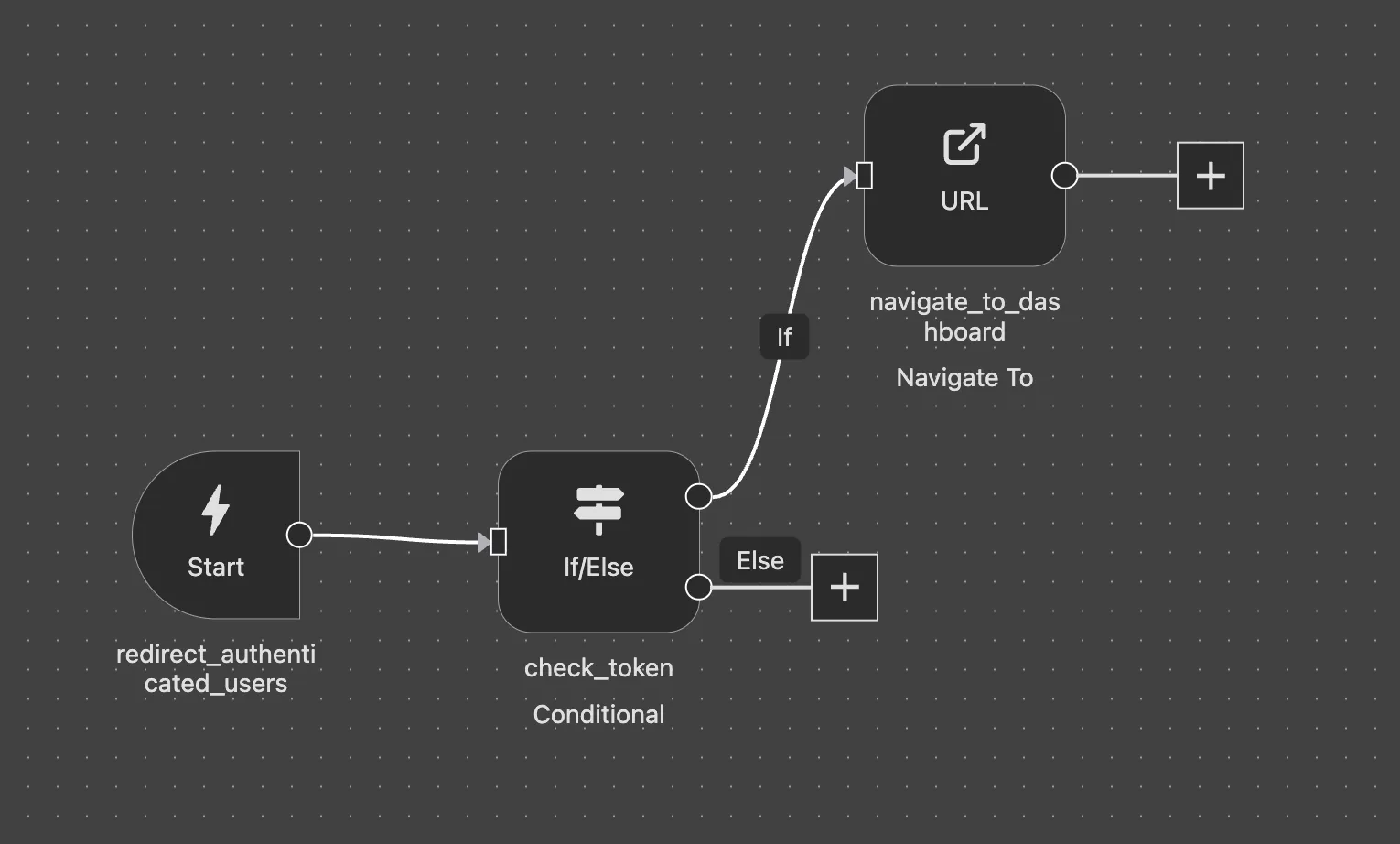
Learn More
Check out the Workflows documentation to learn how to create and configure Workflows in Wized.
Step 4: Configure Elements
Elements connect your WordPress HTML to Wized's logic. Add the wized attribute to elements in WordPress, then configure them in Wized.
For each element, you can configure visibility conditions, set dynamic values, define events.
Sign Out button example:
For the sign out button, we set visibility to return v.user_data, so it only shows when the user is loaded.
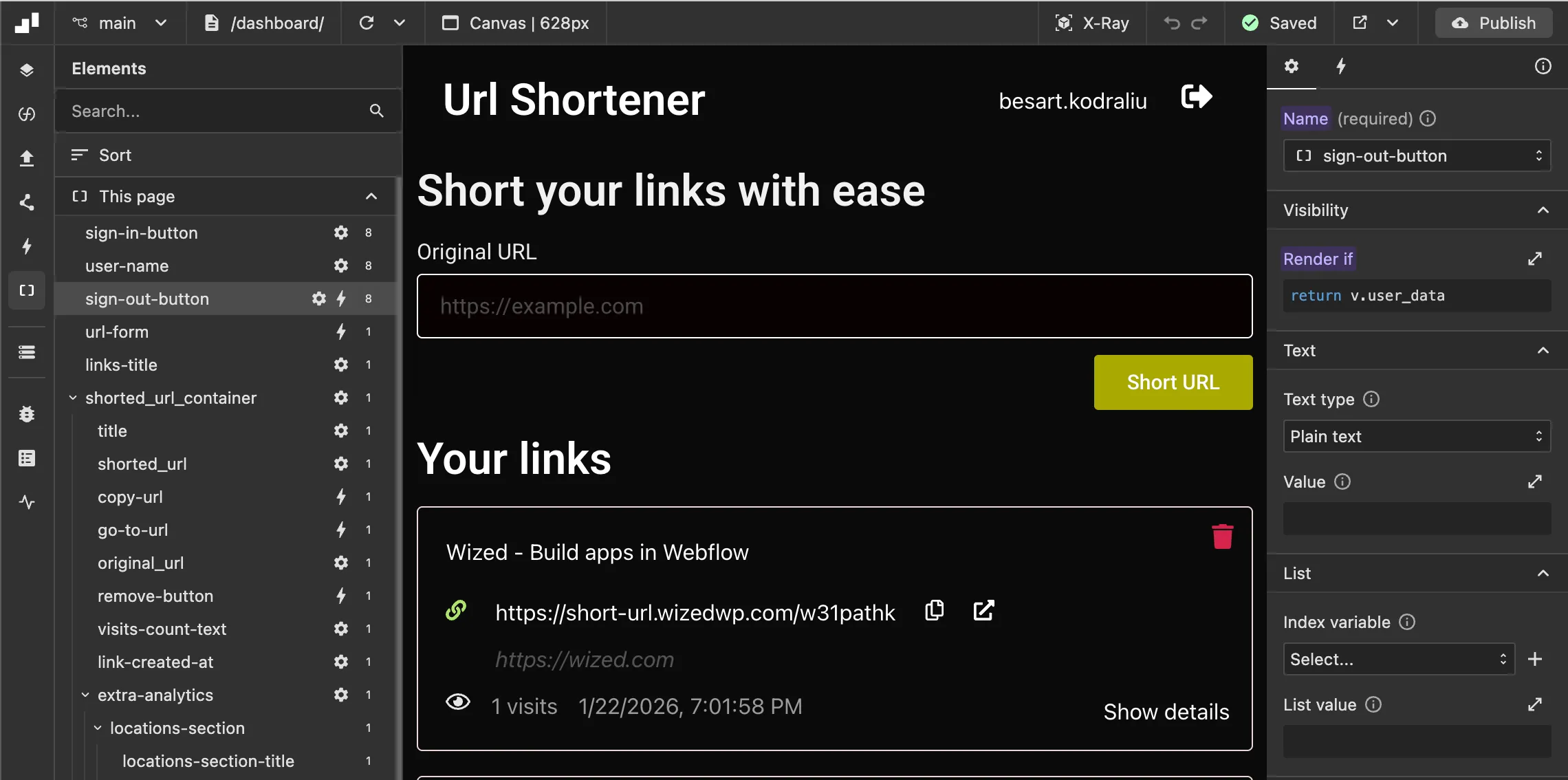
Visibility examples
| Element Name | Type | Configuration |
|---|---|---|
sign-in-button | Button | Visibility: return !v.user_data (hide when logged in) |
sign-out-button | Button | Visibility: return v.user_data (show when logged in) |
Text value example
| Element Name | Type | Configuration |
|---|---|---|
user-name | Text | Text: return v.user_data.name || v.user_data.email.split('@')[0] |
Rendering a List of Items
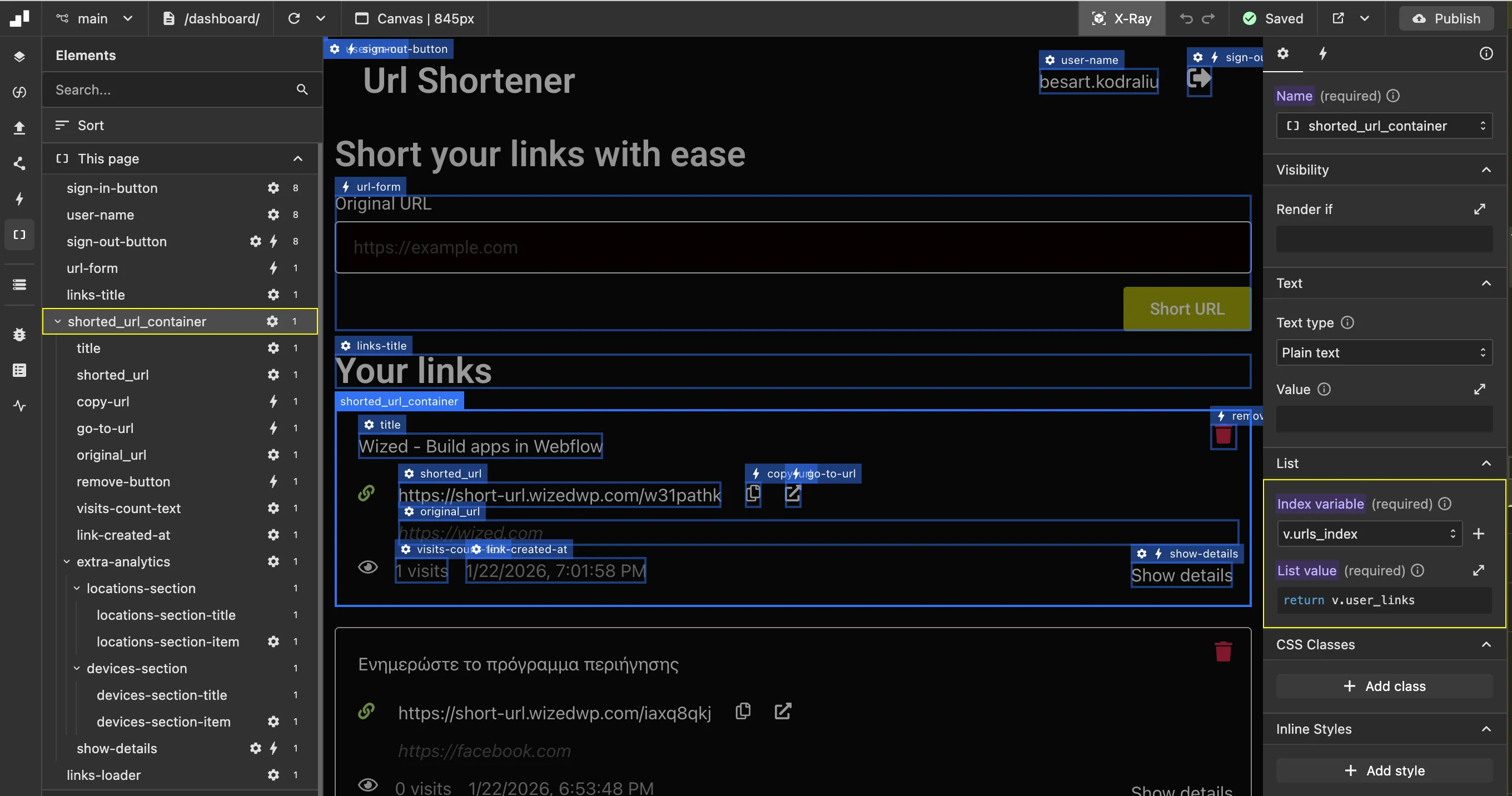
To render a list of items, select the container element that wraps each item. In this example, we render link items from the user_links variable.
Configuration:
- Index Variable: Create a variable (e.g.,
urls_index) to access individual items within the list - List Value: Set the render list expression to
return v.user_links
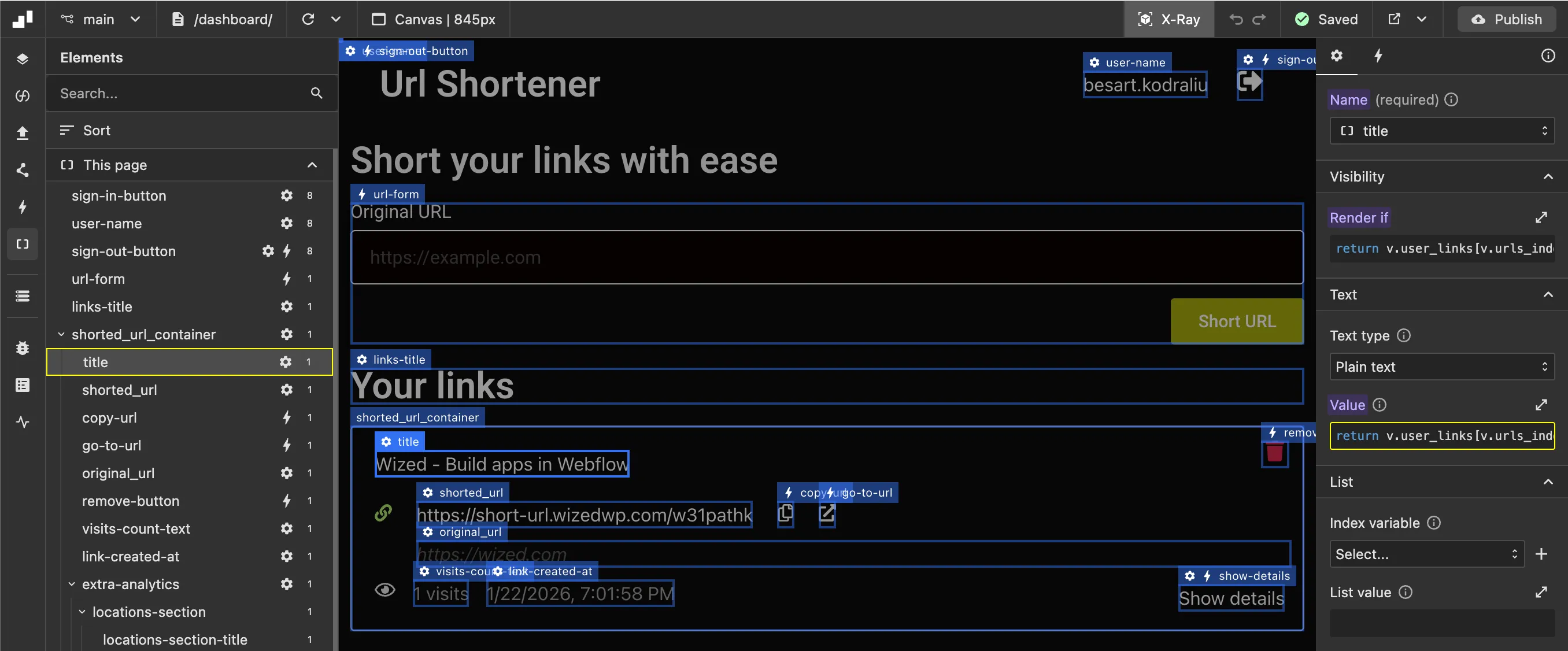
Elements inside the container can then reference the current item using the index variable, such as v.user_links[v.urls_index].
Now we render items, for example for the title, we setup text value return v.user_links[v.urls_index].title
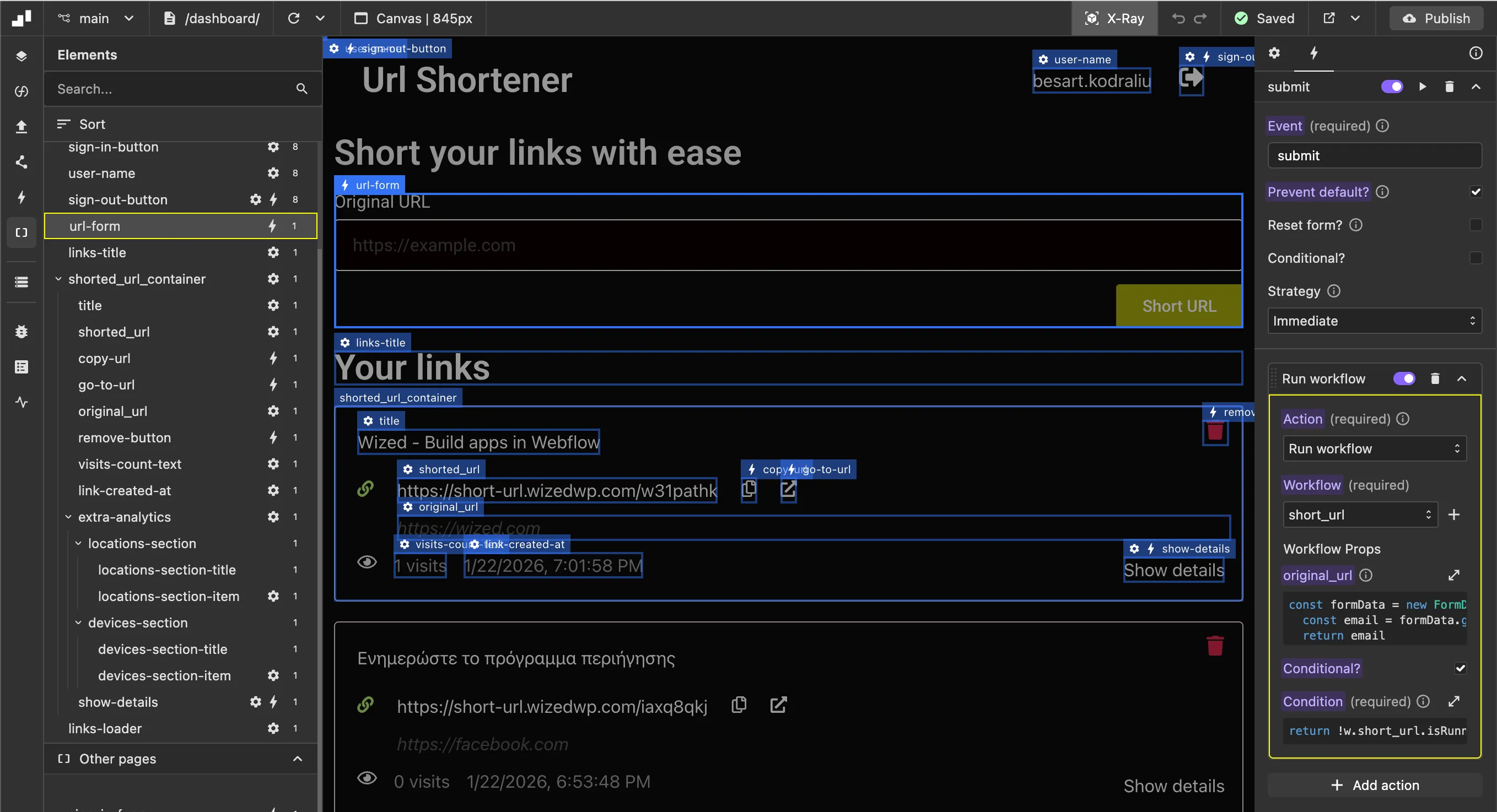
Form submit and events
| Element Name | Type | Configuration |
|---|---|---|
url-form | Form | Triggers short_url workflow |
sign-in-form | Form | Triggers sign_in_workflow |
Complete Elements Reference
Below is a comprehensive table of all elements configured in the URL shortener demo:
Authentication Elements
| Element Name | Configuration Type | Configuration |
|---|---|---|
sign-in-button | Visibility | return !v.user_data |
sign-out-button | Visibility | return v.user_data |
sign-out-button | Event (Click) | Triggers log_out_workflow |
sing-in-form | Event (Submit) | Triggers sign_in_workflow with email and password from form fields |
sing-up-form | Event (Submit) | Triggers sign_up_workflow with email and password from form fields |
user-name | Visibility | return v.user_data |
user-name | Text | return v.user_data.name || v.user_data.email.split('@')[0] |
URL List Container
| Element Name | Configuration Type | Configuration |
|---|---|---|
shorted_url_container | List | Value: return v.user_links, Index Variable: urls_index |
links-title | Visibility | return v.user_links.length>0 |
links-loader | Visibility | return v.links_loading && v.user_links.length===0 |
URL Item Elements
| Element Name | Configuration Type | Configuration |
|---|---|---|
title | Visibility | return v.user_links[v.urls_index].title |
title | Text | return v.user_links[v.urls_index].title |
shorted_url | Text | return `${v.ORIGIN_URL}/${v.user_links[v.urls_index].short_code}` |
original_url | Text | return v.user_links[v.urls_index].original_url |
link-created-at | Text | return Wized.functions.format_date({time:\${v.user_links[v.urls_index].created_at}`})` |
URL Actions
| Element Name | Configuration Type | Configuration |
|---|---|---|
url-form | Event (Submit) | Triggers short_url workflow (condition: return !w.short_url.isRunning) |
copy-url | Event (Click) | Copies short URL to clipboard using navigator.clipboard.writeText() |
go-to-url | Event (Click) | Opens short URL in new tab: window.open(\${v.ORIGIN_URL}/...`, '_blank')` |
remove-button | Event (Click) | Triggers delete_url_workflow with id from v.user_links[v.urls_index].id |
Analytics Elements
| Element Name | Configuration Type | Configuration |
|---|---|---|
visits-count-text | Text | return `${v.user_links[v.urls_index].analytics.length} visits` |
show-details | Text | Returns 'Hide details' or 'Show details' based on v.show_details_section_open |
show-details | Event (Click) | Toggles section visibility and loads analytics summary via toggle_section function |
extra-analytics | Visibility | return v.user_links[v.urls_index].id === v.show_details_section_open |
locations-section-item | List | Value: return v.analytics.top_countries.slice(0,5), Index: analytics_list_index |
locations-section-item | Text | Returns formatted country with flag and count using get_country_name function |
devices-section-item | List | Value: return v.analytics.devices, Index: analytics_devices_index |
devices-section-item | Text | return `${v.analytics_devices_index + 1}. ${item.name} (${item.count})` |
Step 6: Set Up Global Events
Global events trigger workflows on specific pages when certain conditions are met.
Dashboard Page Load
When the dashboard page loads, we trigger the load_user_urls workflow to fetch and display the user's shortened URLs.
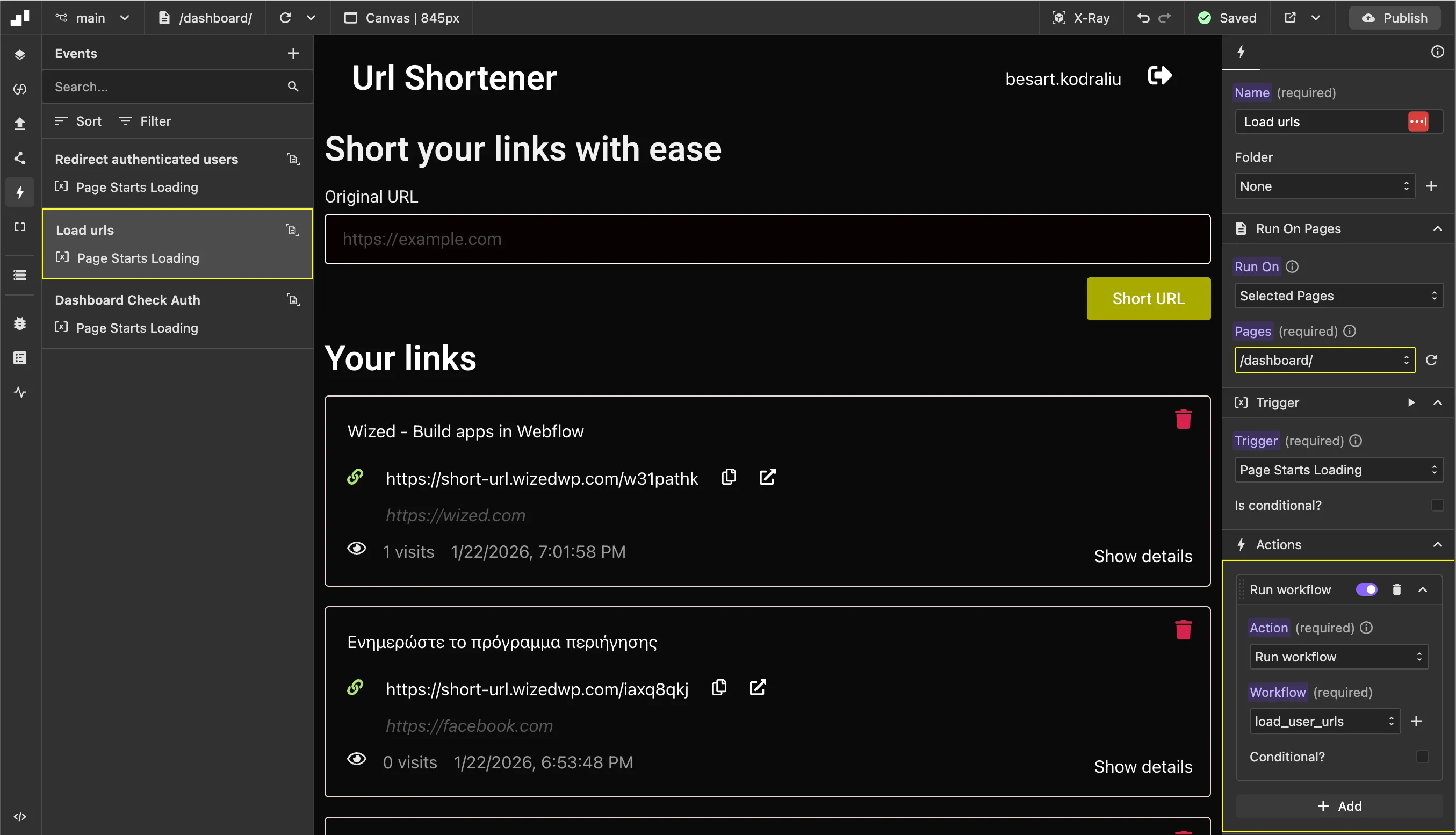
Other events on this project:
| Event Name | Type | Configuration |
|---|---|---|
Redirect authenticated users | Page starts loading (Auth Pages) | Triggers redirect_authenticated_users workflow |
Dashboard Check auth | Page starts loading (Dashboard) | Triggers require_authentication_workflow |
Summary
By following these steps, you've connected:
- WordPress → Provides the visual structure with Wized attributes
- Wized → Manages all dynamic behavior, data binding, and API calls
- Xano → Handles authentication, database storage, and business logic
- Redirect Service → Handles short URL redirects and click tracking
The result is a fully functional URL shortener where users can sign up, log in, create shortened URLs, view their links, and delete them, all without writing complex code in WordPress.